 ARTERY.cn
[PHPBB] 在ACP、UCP“附件管理”中添加图像显示功能

fanny by 2026 / 05 / 08 ∙
Views
首先是:ACP / 帖子 / 管理附件 / 图片
在此处不显示缩图,仅显示一个链接,这很不方便。只需添加两段代码即可显示图片。
打开:./adm/style/acp_attachments.html
查找: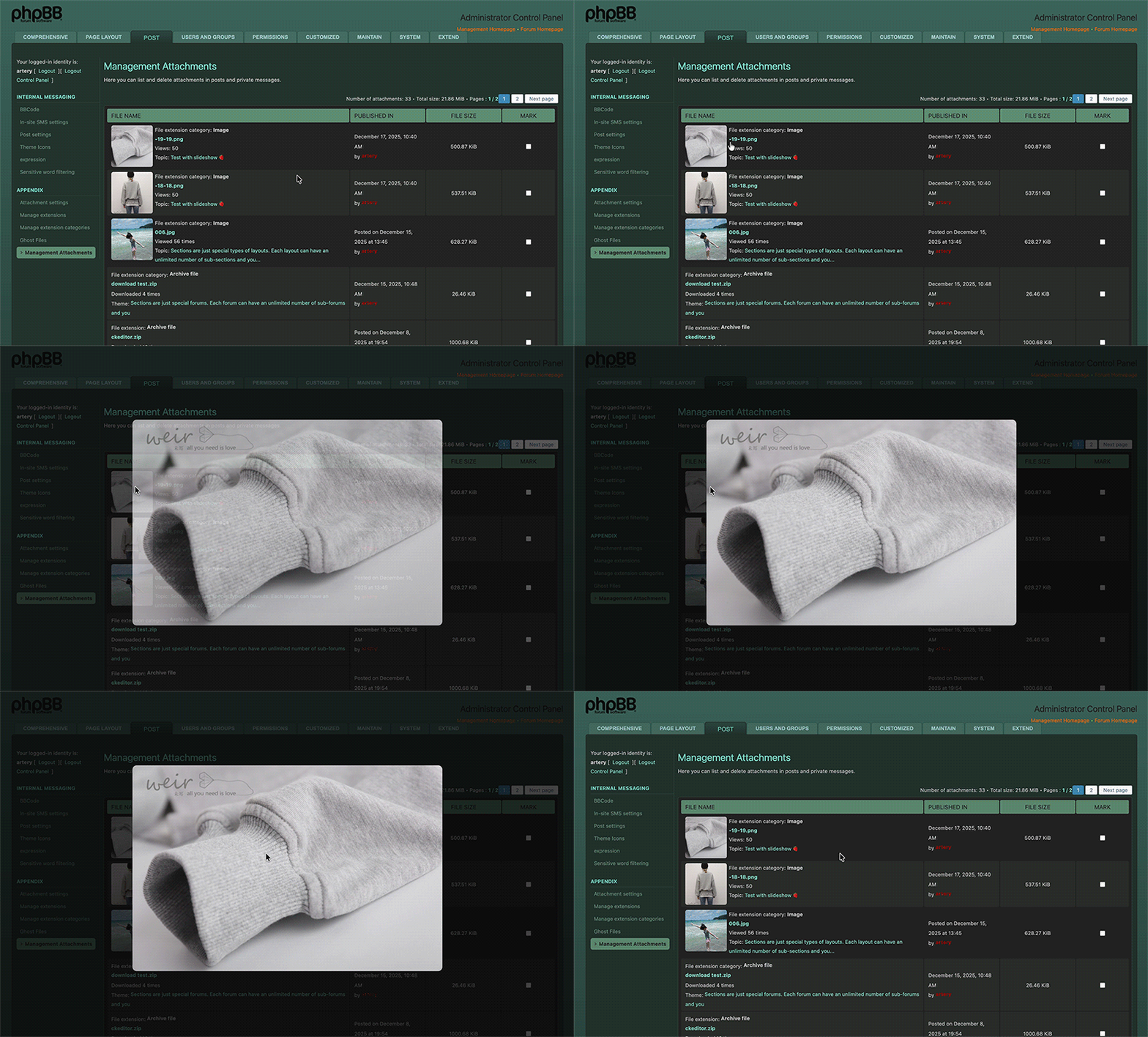
然后是:在 UCP“附件管理”中添加图像显示功能
打开:./styles/prosilver/template/ucp_attachments.html
查找: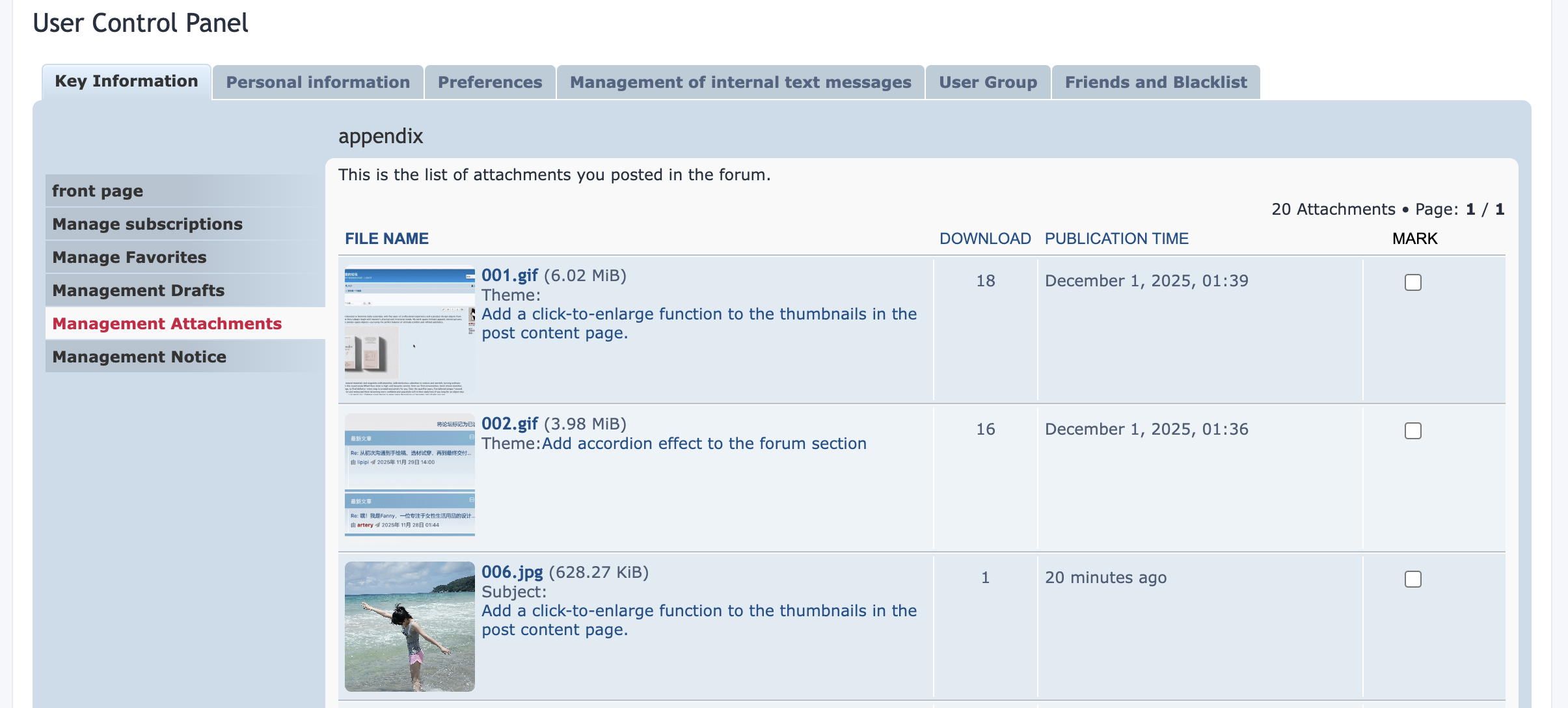
注:在 UCP 附件管理中,我已将小图的加载方式更改为优先加载缩略图,点击后显示原图,从而最大限度地减小了页面大小。此修改不受程序版本更新的影响。
另外,您可以将 CSS 部分添加到当前模板的 CSS 文件中,并将 JS 部分放在服务器上的一个单独文件中,然后在模板文件中引用。这样看起来可能更规范、更有条理。但是,如上所述,直接将代码插入模板也能达到同样的效果,并不会消耗太多额外资源。
在此处不显示缩图,仅显示一个链接,这很不方便。只需添加两段代码即可显示图片。
打开:./adm/style/acp_attachments.html
查找:
	{% for attachments in attachments %}
		<tr>
			<td>
改为:
	{% for attachments in attachments %}
		<tr>
			<td class="acp-attachment-td">
查找:
<!-- INCLUDE overall_footer.html -->在上方添加:
<style>
.acp-thumb-box{width:100px;height:100px;margin-right:5px;flex-shrink:0;border-radius:5px;overflow:hidden}
.acp-thumb-box img{width:100%;height:100%;object-fit:cover;display:block}
.acp-attachment-wrap{display:flex;align-items:flex-start}
.acp-img-overlay{position:fixed;inset:0;background:rgba(0,0,0,.7);display:flex;align-items:center;justify-content:center;z-index:9999;opacity:0;pointer-events:none;transition:opacity .3s ease}
.acp-img-overlay.show{opacity:1;pointer-events:auto}
.acp-img-overlay img{max-width:80vw;max-height:80vh;border-radius:10px}
</style>
<script>document.addEventListener('DOMContentLoaded',()=>{const i=/\.(jpg|jpeg|png|gif|webp)$/i,o=document.createElement('div');o.className='acp-img-overlay',o.innerHTML='<img src="">',document.body.appendChild(o);const l=o.querySelector('img'),d=e=>{l.src=e,o.classList.add('show')},c=()=>{o.classList.remove('show'),l.src=""};o.addEventListener('click',c);const u=(e,t)=>{e.style.cursor='pointer',e.addEventListener('click',n=>{n.preventDefault(),d(t)})};document.querySelectorAll('.acp-attachment-td').forEach(o=>{const l=o.querySelector('a[href]');if(!l)return;const c=l.getAttribute('href'),p=(l.textContent||"").toLowerCase();if(!(i.test(c)||i.test(p)))return;const a=document.createElement('div');a.className='acp-thumb-box';const r=document.createElement('img');r.src=c,a.appendChild(r),u(a,c);const s=document.createElement('div');s.className='acp-attachment-wrap';const g=document.createElement('div');Array.from(o.childNodes).forEach(e=>{g.appendChild(e)}),s.appendChild(a),s.appendChild(g),o.innerHTML="",o.appendChild(s),o.querySelectorAll('a[href]').forEach(o=>{const l=o.getAttribute('href'),c=(o.textContent||"").toLowerCase();(i.test(l)||i.test(c))&&u(o,l)})})});</script>
然后是:在 UCP“附件管理”中添加图像显示功能
打开:./styles/prosilver/template/ucp_attachments.html
查找:
					<div class="list-inner">
						<a href="{attachrow.U_VIEW_ATTACHMENT}" class="topictitle attachment-filename ellipsis-text" title="{attachrow.FILENAME}">{attachrow.FILENAME}</a> ({attachrow.SIZE})<br />
						<!-- IF attachrow.S_IN_MESSAGE -->{L_PM}{L_COLON} <!-- ELSE -->{L_TOPIC}{L_COLON} <!-- ENDIF --><a href="{attachrow.U_VIEW_TOPIC}">{attachrow.TOPIC_TITLE}</a>
					</div>
改为:
					<div class="list-inner">
                        <div class="acp-attachment-td">
						<a href="{attachrow.U_VIEW_ATTACHMENT}" class="topictitle attachment-filename ellipsis-text" title="{attachrow.FILENAME}">{attachrow.FILENAME}</a> ({attachrow.SIZE})<br />
						<!-- IF attachrow.S_IN_MESSAGE -->{L_PM}{L_COLON} <!-- ELSE -->{L_TOPIC}{L_COLON} <!-- ENDIF --><a href="{attachrow.U_VIEW_TOPIC}">{attachrow.TOPIC_TITLE}</a></div>
					</div>
查找:
<!-- INCLUDE ucp_footer.html -->在上方添加:
<style>
.acp-thumb-box{width:100px;height:100px;margin-right:5px;flex-shrink:0;border-radius:5px;overflow:hidden}
.acp-thumb-box img{width:100%;height:100%;object-fit:cover;display:block}
.acp-attachment-wrap{display:flex;align-items:flex-start}
.acp-img-overlay{position:fixed;inset:0;background:rgba(0,0,0,.7);display:flex;align-items:center;justify-content:center;z-index:9999;opacity:0;pointer-events:none;transition:opacity .3s ease}
.acp-img-overlay.show{opacity:1;pointer-events:auto}
.acp-img-overlay img{max-width:80vw;max-height:80vh;border-radius:10px;position:absolute;top:50%;left:50%;transform:translate(-50%,-50%)}
</style>
<script>document.addEventListener('DOMContentLoaded',()=>{const i=/\.(jpg|jpeg|png|gif|webp)$/i,o=document.createElement('div');o.className='acp-img-overlay',o.innerHTML='<img src="">',document.body.appendChild(o);const l=o.querySelector('img'),d=e=>{l.src=e,o.classList.add('show')},c=()=>{o.classList.remove('show'),l.src=""};o.addEventListener('click',c);const u=(e,t)=>{e.style.cursor='pointer',e.addEventListener('click',n=>{n.preventDefault(),d(t)})};document.querySelectorAll('.acp-attachment-td').forEach(o=>{const l=o.querySelector('a[href]');if(!l)return;const h=l.getAttribute('href'),p=(l.textContent||"").toLowerCase();if(!(i.test(h)||i.test(p)))return;const a=document.createElement('div');a.className='acp-thumb-box';const r=document.createElement('img');r.src=h+'&t=1';r.onerror=function(){this.src=h;this.onerror=null};a.appendChild(r),u(a,h);const s=document.createElement('div');s.className='acp-attachment-wrap';const g=document.createElement('div');Array.from(o.childNodes).forEach(e=>{g.appendChild(e)}),s.appendChild(a),s.appendChild(g),o.innerHTML="",o.appendChild(s),o.querySelectorAll('a[href]').forEach(o=>{const l=o.getAttribute('href'),c=(o.textContent||"").toLowerCase();(i.test(l)||i.test(c))&&u(o,l)})})});</script>
注:在 UCP 附件管理中,我已将小图的加载方式更改为优先加载缩略图,点击后显示原图,从而最大限度地减小了页面大小。此修改不受程序版本更新的影响。
另外,您可以将 CSS 部分添加到当前模板的 CSS 文件中,并将 JS 部分放在服务器上的一个单独文件中,然后在模板文件中引用。这样看起来可能更规范、更有条理。但是,如上所述,直接将代码插入模板也能达到同样的效果,并不会消耗太多额外资源。